
Paying more to stand still.
You’re buying premium capacity to keep records your team rarely opens. Every renewal brings the same conversation.
SEARCHABLE ARCHIVE FOR SALESFORCE
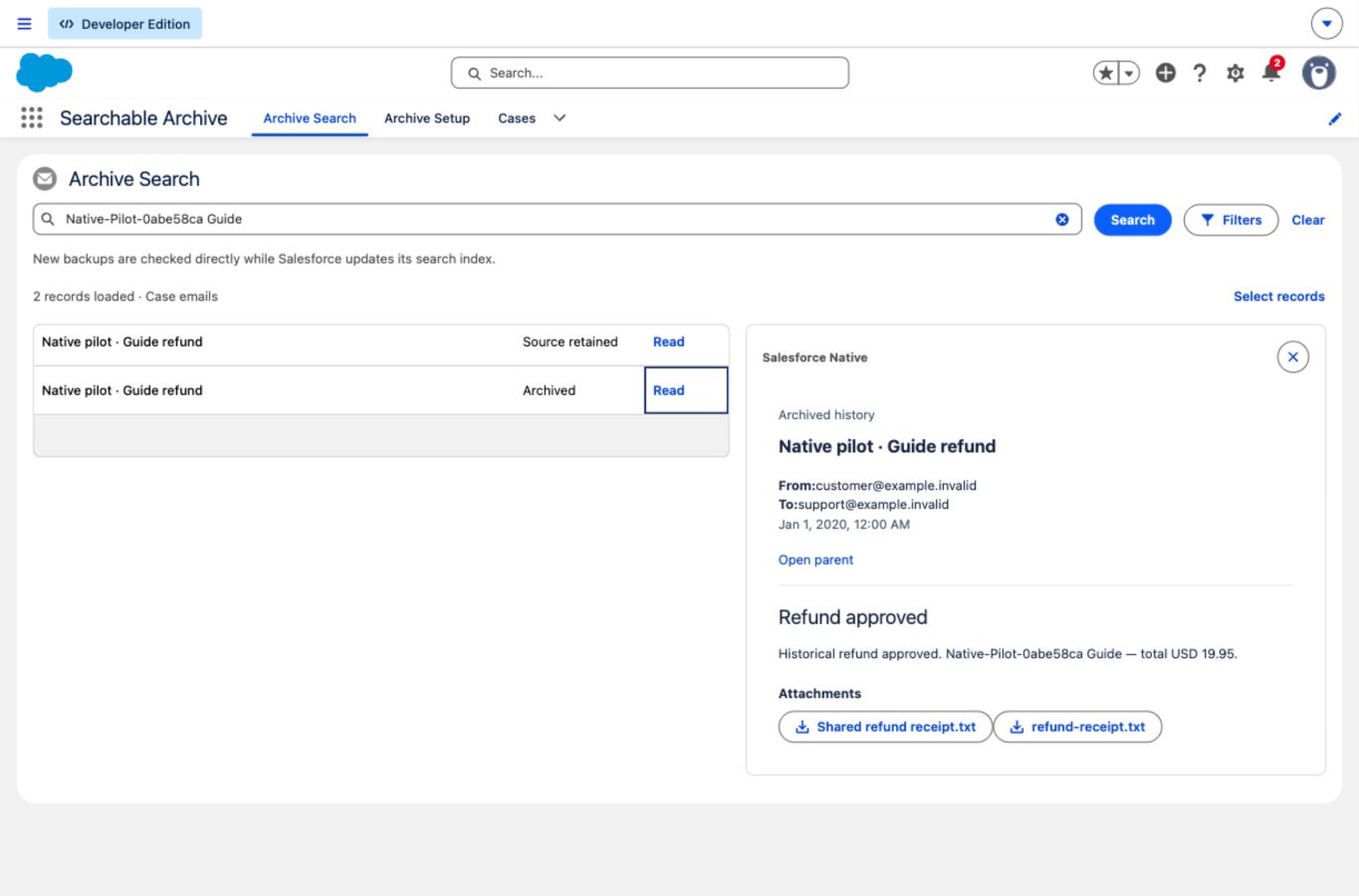
Archive historical emails on closed Cases and keep them searchable in Salesforce, so your team can find the context they need.
Less storage pressure.
More peace of mind.
SOUND FAMILIAR?
Old data quietly fills your org. Then the renewal lands, the warning appears, and it becomes your problem.
You’re buying premium capacity to keep records your team rarely opens. Every renewal brings the same conversation.
Storage alerts steal time from the work you planned. Emergency exports and rushed cleanups aren’t a strategy.
Support still needs the conversation. Your team still needs the context. “Just delete it” has never been that simple.
FAMILIAR WORKSPACE
Find and review supported archived emails without leaving your Salesforce workflow.
Search by words, subject or record ID, then open the detail you need.
Access follows supported sharing rules. Restore is a separate permission.
START WITH CLARITY
Start with a read-only assessment, review the details, and choose the right storage mode.
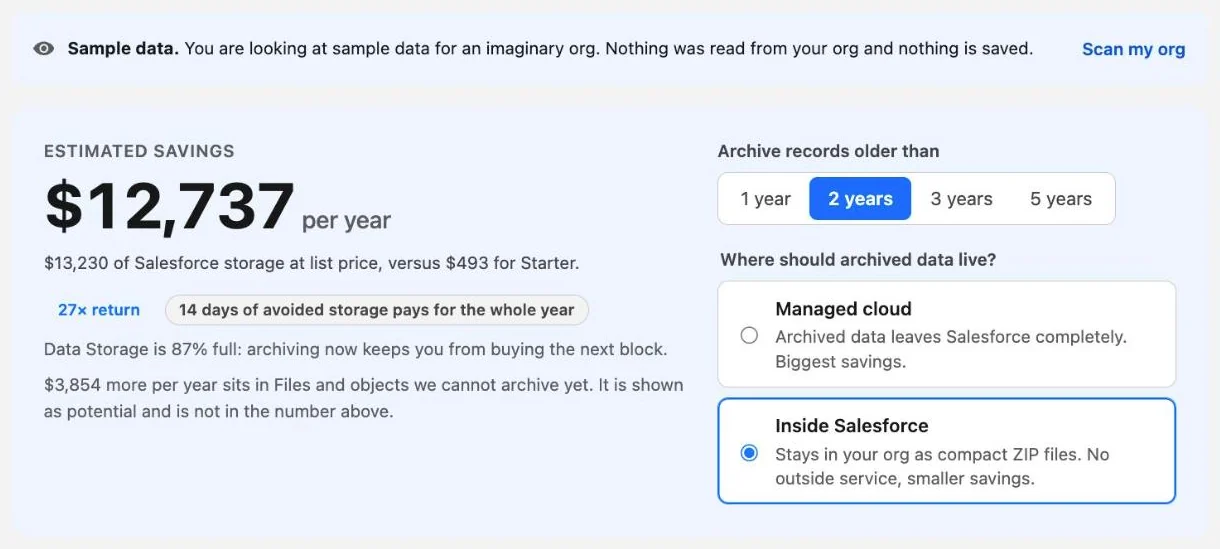
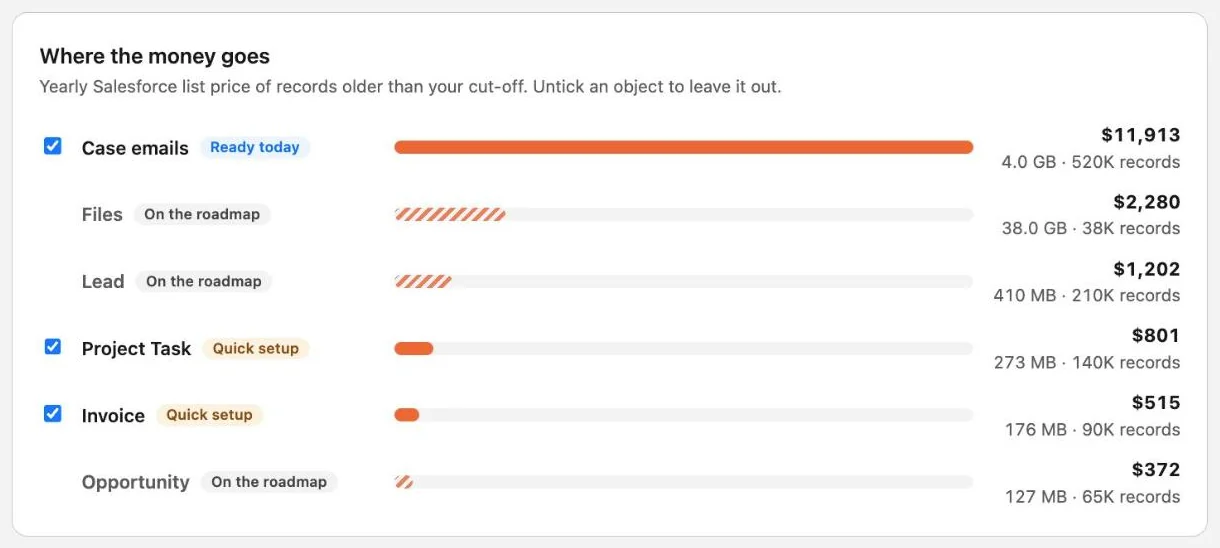
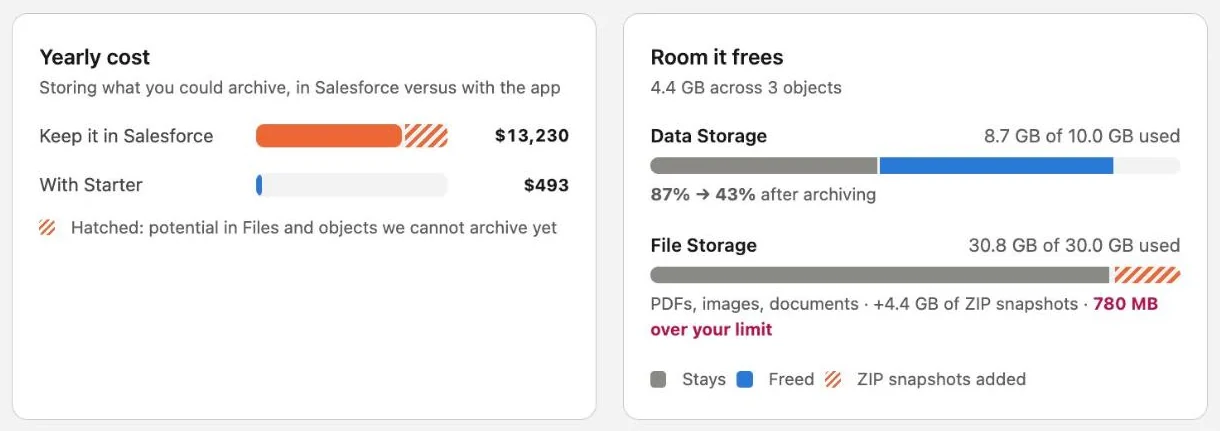
Actual product screens · Sample org and illustrative estimates
Search, read and export supported archived records from Salesforce. Restore when you need them back.
Supported readers follow current parent access and readable fields. Restore is a separate permission.
Review the estimate, adjust assumptions and share a report with the people who own the budget.
CONTROL AT EVERY STEP
No leap of faith. Start with a read-only assessment and a sandbox evaluation before enabling archiving.
Plan my first assessment ↗
The first run only copies.
You review and
verify before source deletion is enabled.
Scan supported objects, inspect age and volume, and identify what can be archived. The scan doesn’t copy or delete records.
Use your own contract rates, storage usage and costs. Choose the cohort, plan and storage mode that make financial sense.
Evaluate a supported recipe in a sandbox. Check the copy, search and restore before approving any source removal.
Your team can find the archived context inside Salesforce. Authorized search, export and restore remain available if your plan ends.
MAKE THE NUMBERS YOURS
A little less “we need more space.”
A little more budget for
what comes next.
This is a scenario, not an org scan or a quote. Use capacity you can actually avoid buying or remove at renewal, and include your archive operating costs.
PRICED FOR YOUR ORG. NOT EVERY SEAT.
One plan per Salesforce org, in the storage mode you choose. No
per-user fees.
Early access includes an assisted setup and a
14-day in-app trial.
We store the archive in our AWS account in us-east-1 (N. Virginia), outside your org. You don’t need an AWS account of your own.
The archive stays inside your Salesforce org as Files, so it uses File Storage. Lower price; nothing leaves your org.
Same archive capacity and object limits in both modes.How each mode handles your data
Start with your biggest storage pressure.
Give more of your history a smarter home.
For larger, carefully scoped rollouts.
USD, excluding applicable taxes. Monthly plans, priced per Salesforce org and storage mode. Archive capacity and object limits are the same in both modes. Archive capacity is logical archived data, not reclaimed Salesforce storage. Managed Cloud is hosted and operated by us; Native snapshots count against your Salesforce File Storage. *Supported and certified object recipes only. Deployment scope is confirmed during evaluation. Early access; payment is not collected on this website.
Historical EmailMessage records on closed Cases, with the Cases retained. Compatible custom objects can be added after recipe configuration and sandbox certification.
Not a general-purpose Salesforce backup. Arbitrary object graphs, OCR and Global Search are outside the current scope. Existing ContentDocuments stay in Salesforce; File Storage savings aren’t promised.
GOOD QUESTIONS. CLEAR ANSWERS.
You’re responsible for your org.
You should know exactly
what’s involved.
No. The assessment is read-only. It counts records and estimates size across the objects the scanning user can access. It doesn’t copy, archive or delete source records.
Yes. Supported archived emails can be searched, read and exported through the app inside Salesforce. Access depends on the current parent Case and readable fields. This is the app’s archive search, not Salesforce Global Search or standard reporting.
The initial run copies only. Source removal requires verification and certification of the supported recipe, plus an explicit activation. Sandbox testing should cover your schema, permissions, automation, attachments and restore behavior.
You choose a mode. Managed Cloud, the default, stores the archive in our AWS account in the us-east-1 (N. Virginia) region, the only region offered at launch. Native stores it inside your own Salesforce org, and its ZIP snapshots consume Salesforce File Storage. We confirm the mode, region, storage footprint and operating costs with you during evaluation. See the data flow for each mode.
The difference covers the AWS hosting and operations we provide in Managed Cloud. Native keeps the archive inside your Salesforce org, where it uses your File Storage. Archive capacity and object limits are the same at each plan. A Managed Cloud plan can also be used in Native mode; a Native plan can’t be used for Managed Cloud.
No. Estimates depend on your data, archive footprint, contract pricing and operating costs. Reclaiming capacity saves cash only when it avoids a purchase or allows a renewal reduction. Salesforce Storage Usage and your contract are the sources of truth. This app currently does not promise savings on existing ContentDocuments.
Authorized search, export and restore remain available when the plan expires; new archive writes are restricted. Restore is subject to supported schema, permissions and Salesforce validation. Recreated records after purge receive new IDs, and not all system fields can be retained.
Searchable Archive is in early access and is not an AppExchange-approved release. Managed installation and security review remain release gates. Contact us for an assisted sandbox evaluation and the current supported-data scope.
YOUR NEXT RENEWAL DESERVES A BETTER PLAN.
Let’s find out what your org can archive,
what stays
accessible, and whether the numbers work.
Tell us where storage is getting in your way.